
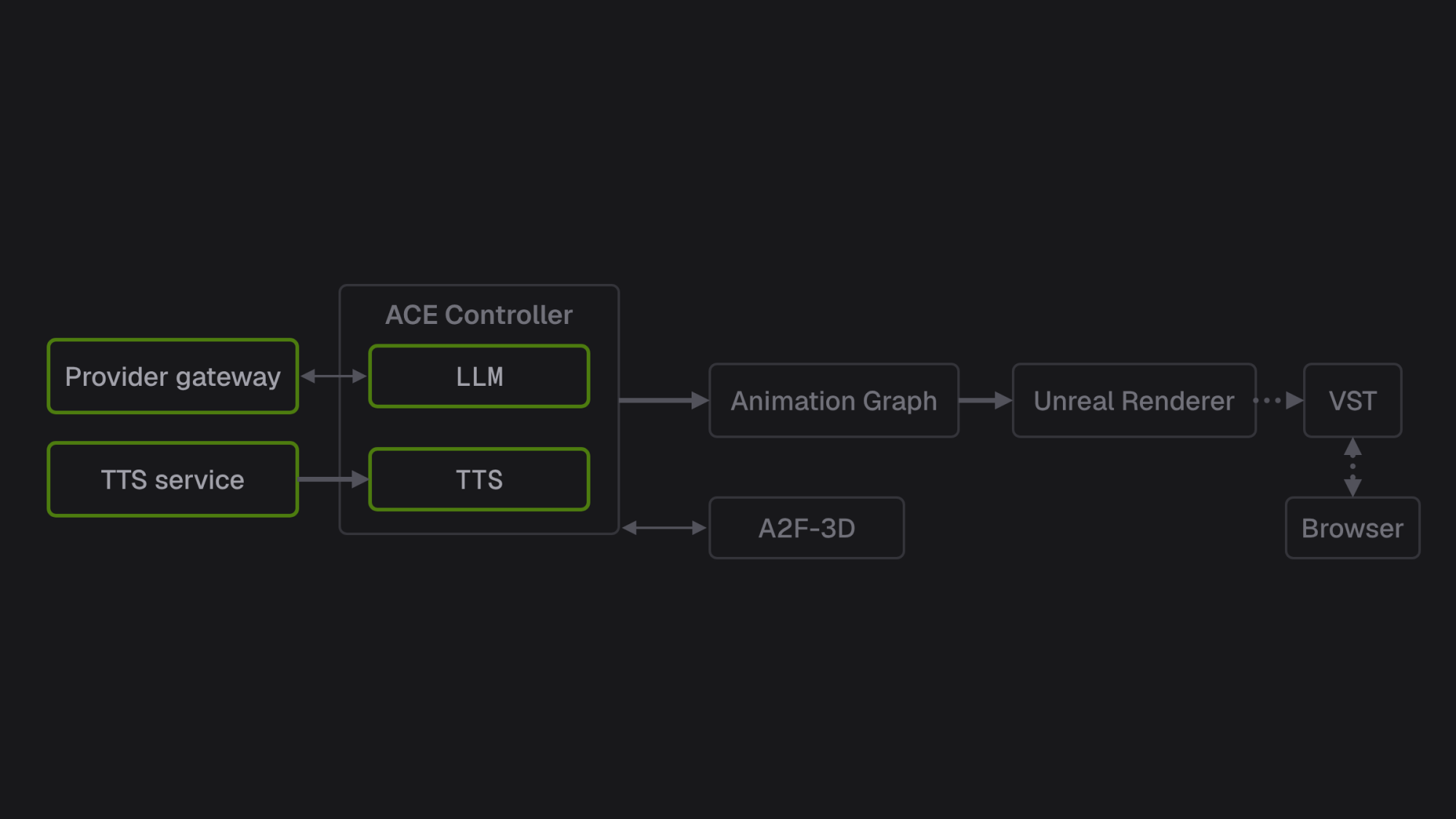
This is the second of two articles on running a custom Character Creator 5 (CC5) character as an NVIDIA Tokkio avatar. It starts from Part 1‘s hand-off package [1] and ends with the avatar holding Japanese conversations in a browser, as it did over two days of a live event in September 2026.
We ran Tokkio 5.0 GA (general availability) [2], kept NVIDIA’s container images as shipped, and replaced the language model (LLM) and text-to-speech (TTS) services behind the ACE Controller with our own. Our own measurements carry a sample size and a date. We publish no performance figures for NVIDIA components.
1. Define the runtime deliverable
Our definition of done was a Japanese conversation with the avatar in a browser, with lip sync. Every startup check had to pass, the renderer had to survive a soak of at least 12 hours without a restart, and no silence inside a turn could last longer than five seconds.
Running is not ready: we saw the stage dead while every pod reported Running. On 2026-09-17 the startup check had 48 items and passed all of them on the revision we took to the event. Gaps remain: the exact renderer binary we shipped has no continuous 12-hour run on file, and no turn was ever timed end to end against the five-second limit (section 11).
2. Pin the stack
As of September 2026, 5.0 GA is the latest published Tokkio release and its documentation has moved to the archive site, so pin everything.
| Component | What we ran |
|---|---|
| Tokkio app chart | tokkio-1stream-with-ui 5.0.0-GA, one-click install, single node, bare metal |
| ACE Controller | 5.0.0, built on pipecat 0.0.68 [2] |
| Audio2Face-3D (A2F-3D) | 1.3.16 [3] |
| Riva | 2.19.0, with the ja-JP streaming Conformer swapped in (section 7) |
| Unreal Renderer microservice | 0.1.3 |
| Unreal Engine build | 5.5.4, Linux, Development configuration |
| Video Storage Toolkit (VST, also called VMS) | 1.3.0 |
| Animation Graph | 1.1.0 |
| Kubernetes | kubeadm 1.31.2, containerd 1.7.23 with the systemd cgroup driver on cgroup v2 |
| GPU Operator | v24.9.2, NVIDIA Container Toolkit 1.17.4, Container Device Interface (CDI) off |
| Host | Ubuntu 22.04 LTS, kernel 5.15, 2x NVIDIA RTX 6000 Ada Generation |
NVIDIA’s ACE plugins for Unreal are built for Unreal Engine 5.3 and must be rebuilt for other versions [4]. The renderer author rebuilt and modified them for our 5.5.4 build.
3. Keep the ACE Controller, replace what sits behind it
The ACE Controller, Riva, Audio2Face-3D, the Animation Graph, the renderer, Stream Distribution and Routing (SDR), VST and the UI all run from their stock images. The controller sends the answer audio to Audio2Face-3D, whose animation reaches the renderer through the Animation Graph [5]. We replaced what sits behind the controller: the LLM and the TTS (Figure 1).
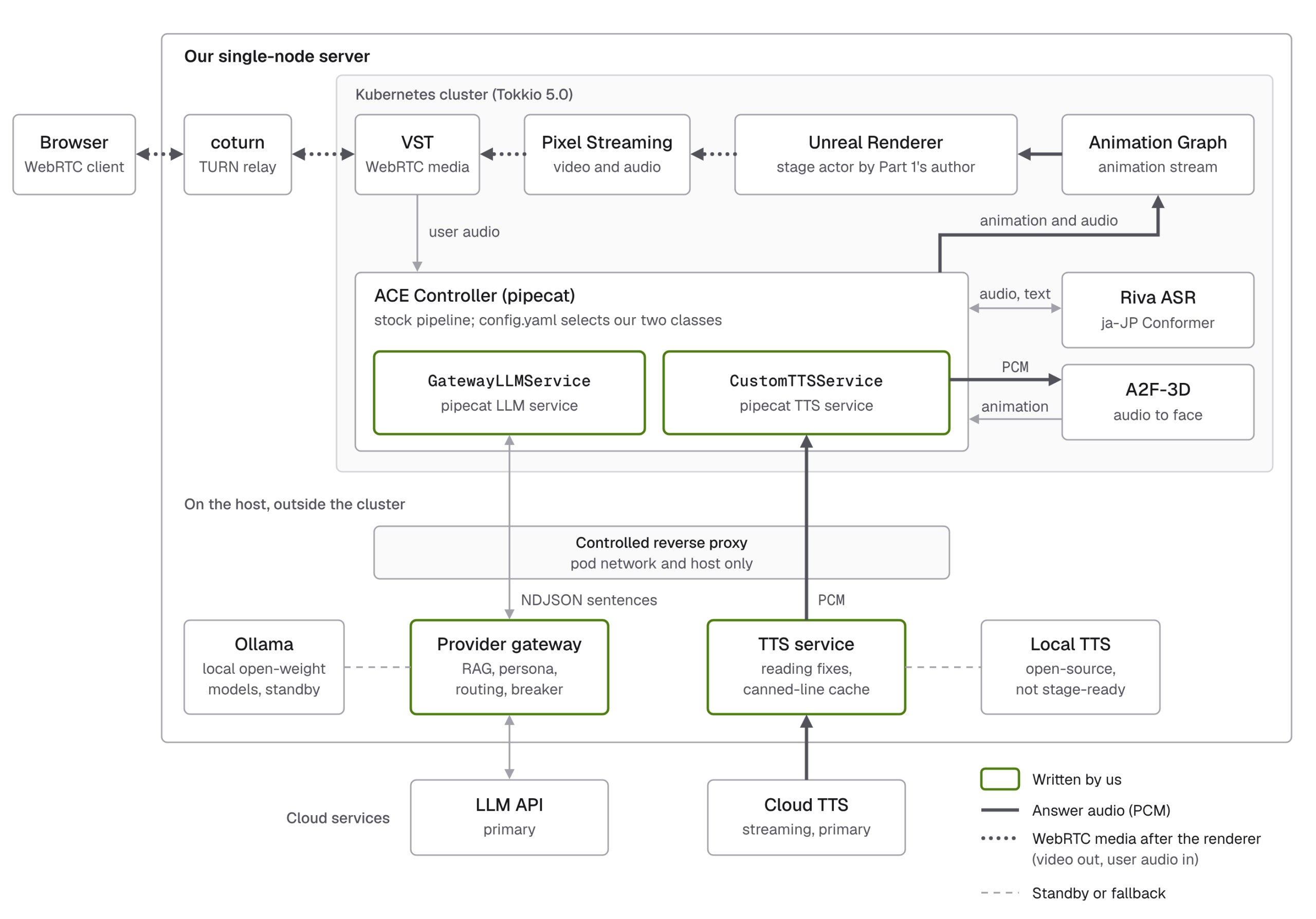
The controller is pipecat plus NVIDIA’s nvidia-pipecat extension [6], with its code and config on a persistent volume claim mounted at /code. NVIDIA documents llm_processor in config.yaml for the LLM, and edits to bot.py for other processors [7]. In practice, llm_processor accepts only the three stock class names, and the shipped bot.py builds the stock cloud TTS unconditionally; on an install without a key for it, you get transcripts with no voice. On the controller volume, we added our class name and a tts_processor key to config.py, and changed bot.py to build our classes and to fail loudly when their config section is missing. The same file also sets the Riva language and model, the voice activity detection (VAD) parameters, and the automatic speech recognition (ASR) word list.
Our provider gateway and TTS service listen on the host’s loopback, which the controller pod cannot reach. A reverse proxy on the host forwards to them, admits only the pod network and the host itself, and turns buffering off for streaming. That is segmentation, not authentication. The gateway calls a cloud LLM API first, with local open-weight models served by Ollama (a 32B primary and a 7B standby) as the fallback. It emits one newline-delimited JSON (NDJSON) line per sentence, so TTS starts on the first sentence while the model is still writing. Our TTS service calls a cloud streaming TTS service.
The controller volume sits outside git and review, so the startup check hashes each injected module against the release and checks that bot.py constructs each class; its first run found two drifted modules.
4. Accept the packaged renderer as a runtime contract
The author of Part 1 also built the renderer package, including the stage actor, the facial mapping and the patches to NVIDIA’s Unreal plugins. The renderer author verified HTTP stream registration and removal and the face-animation receive path on an earlier Windows package with a mock Animation Graph. The earlier Linux package was verified up to the build and transfer integrity, and a later Linux build was started and rendered on a Linux GPU. This article covers the rest of the acceptance: running inside Tokkio on our server, real Audio2Face-3D output and dialogue, browser video and audio over WebRTC, and long runs.
Each frame, the stage actor reads the interpolated ACE weights and maps the 52 ACE inputs to 62 animation curves. A dedicated AnimInstance outputs the curves through the animation proxy, and the character’s Reallusion Rig Logic post-process Animation Blueprint turns them into morph targets and jaw and eye bone poses.
Part 1’s section 7 maps the same 52 inputs to 54 CC5 targets [1]. Four mouth inputs gained outputs, and the output names follow the character’s facial profile.
| ACE input | Outputs in Part 1 | Outputs in the stage build |
|---|---|---|
| MouthFunnel | 1 | 4, one per quadrant |
| MouthPucker | 1 | 4, one per quadrant |
| MouthRollLower | 1 | 2, left and right |
| MouthRollUpper | 1 | 2, left and right |
That adds eight outputs, so 54 becomes 62. Two inputs are approximations: MouthClose drives a lip-tightening shape, so closed lips are not guaranteed, and MouthShrugUpper maps to an approximate control. MouthShrugLower uses the character’s existing bone-driven pose. This mapping comes from an earlier renderer build. Later builds, the stage build among them, moved the same mapping into a new actor class. At startup the stage build’s log shows all 62 bindings resolved, which does not mean that every expression or real speech looks right.
The per-frame step below is an excerpt from that earlier renderer build, with logging and verification code omitted.
At runtime, the actor that the stream helper’s GetActor() returns must carry a UACEAudioCurveSourceComponent [4]. Without it, the build looks healthy but answers SDR’s add_stream with HTTP 400 and “Failed to subscribe character to stream!”, and the browser gets audio without video until the UI reports VST_INBOUND_STREAM_ERROR [8].
A build can start cleanly and register with the signalling server, then still fail at the first subscription or after roughly a day of uptime.
| Step | What we check | What failure looks like |
|---|---|---|
| Startup log checks | Log lines for the validated mapping, the actor registered with its audio curve source and the frame-rate cap, and the setting r.GPUStatsEnabled=0 in effect. Then port 8021 [9] is listening and answers GET /health from inside the cluster. | A line is missing, or port 8021 does not answer while the pod stays Running. |
| Soak | 12 hours or more, sampled every 30 minutes: container restarts, the GPU memory trend, and name-table (FName) growth while idle. | Sustained FName growth is a failure signal to investigate. The earlier long-run crash has not been reproduced and attributed to this cause. |
For FName growth, the renderer author traced a per-frame name to Unreal Engine 5.5’s realtime GPU profiler. The growth reproduced while idle and stopped in a short test with r.GPUStatsEnabled=0. That does not show it caused the earlier crash, so we also recreate the renderer pod before each show day.
5. Two pipecat details that decide what the avatar remembers
Two behaviors of pipecat 0.0.68 decide what the model later sees as its own answers.
The first is a contract. A TTS service forwards LLMFullResponseEndFrame only when push_text_frames is on; otherwise the “subclass must do it” [10]. Our TTS class turns push_text_frames off because run_tts emits its own text frames, so the end frame was dropped and the assistant context aggregator never got its designed commit point.
We reproduced this in the controller pod on 2026-09-04 with a reduced pipeline: three uninterrupted turns, one run per variant. All three answers stayed uncommitted. Forwarding the frame once, after synthesis, committed all three. From the pipecat code, the full pipeline’s aggregator also commits when the bot stops speaking, including between sentences, so without the fix commits follow speaking gaps rather than the ends of answers. We did not isolate this on the live stack.
Note. From pipecat 0.0.108 (pull request #4145), the base class emits the end frame itself [11]. On those versions a turn with no audio still loses the frame, an issue still open on 2026-09-28 [12]; with this override on 0.0.68, the frame is forwarded whether or not the turn produced audio.
The second behavior is how a barge-in is filed. On an interruption, pipecat commits the sentences whose text frame already reached the aggregator and drops the rest, which we reproduced in the pod on 2026-09-04, in one run. So our TTS service yields each sentence’s text frame after its audio has fully streamed out, and a sentence cut mid-audio is not filed as said. Precision is one sentence, because the service returns audio without word timestamps. The next request’s history marks a cut answer with a prefix meaning “answer cut off by the listener”.
6. Design against dead air
Five seconds of silence inside a turn was our hard limit, the dead-air limit. Every design choice was checked against it (Figure 2).
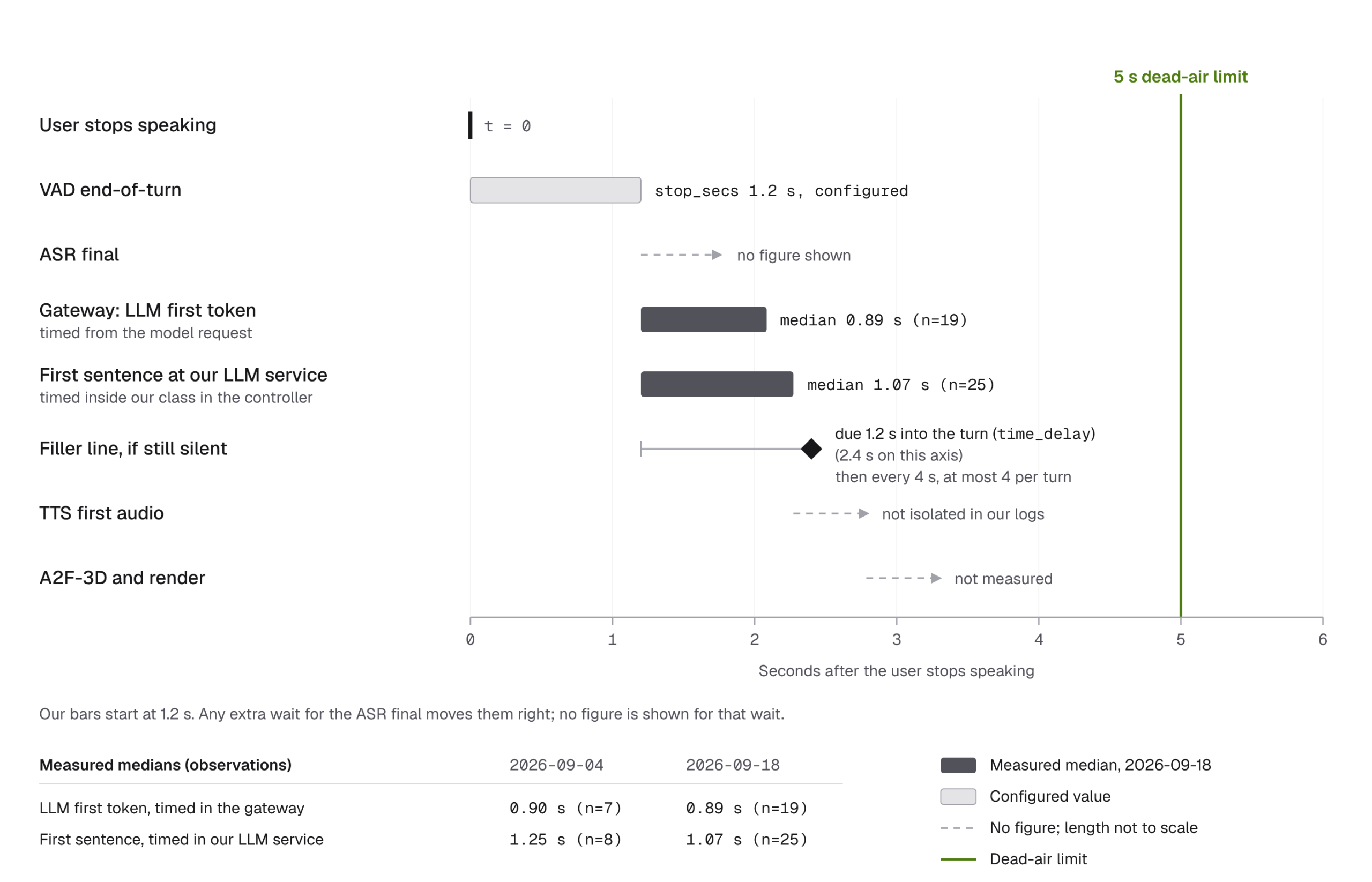
The two measured series in Figure 2 start at different points and do not add up. The first-sentence series can also read low, because a barge-in before the first sentence stops its clock. We never measured microphone to speaker.
A filler watchdog in our LLM service speaks the first filler line time_delay seconds after the last text sent to TTS; we ran it at 1.2 s. It then speaks one more for every further four seconds of silence, at most four per turn, and stops at the first model sentence.
A filler line plays before the model has said anything, so it must not assert anything. In testing,「ええ、ええ」(“yeah, yeah”) after a yes-or-no question was a false “yes”. We deleted six agreeing lines and keyed the filler pools by the listener’s intent, which deterministic suffix rules classify without a model call. Questions never hear an acknowledgement, statements never hear “good question”, and unknown intent gets neutral interjections. A misclassification can add an acknowledgement or a “good question”, never an answer; we have not measured how often one happens. Keep filler: [] rather than deleting it, or the stock English fillers come back.
LLM failover is allowed only inside the switch window, from turn start until the model’s own first sentence leaves the gateway. Filler lines do not close it. After it closes, the provider is sticky for the turn. An LLM stream over server-sent events (SSE) succeeds only with [DONE] or a finish_reason; a stream that just stops, or an empty answer, is a failure. With an invalid cloud key (2026-09-02, n=2 turns), the local 32B model answered with fallback reason auth.
stop_secs 1.2 s, filler time_delay 1.2 s, then every 4 s, at most 4 per turn); every other duration is illustrative, not measured.Video 1’s narration is AI-generated with a stock voice of an open-source text-to-speech model; it is not the avatar’s voice, and the system itself does not use that model. In the slow turn, no silence reaches 5 s, but the primary fails fast. If it hung until its timeout instead, the wait would outlast all four filler lines, so the watchdog alone does not bound dead air. In the barge-in, only sentences whose audio had fully streamed out of the TTS service are kept, and the next request marks the answer as cut off by the listener (section 5).
Reasoning models are banned, because their content stays empty while they think. OpenAI’s gpt-5.6-terra passed our admission check in 3 runs on 2026-08-17, each with a prompt first content delta, no reasoning deltas and a clean finish.
Over two days of a live event in September 2026, rehearsals and staff tests included, the gateway’s log recorded 405 conversation requests, all answered with HTTP 200, and no warning or error entry. That does not prove that every turn completed or that no failover happened: an empty answer can fail over without a warning, and the log keeps no per-turn outcome.
7. Make Japanese speech sound right
Switching Riva from English to the Japanese streaming Conformer [13] takes two coordinated edits. The model argument of the triton0 Deployment, in both the main and the model-init containers, becomes rmir_asr_conformer_unified_ja_jp_str:2.19.0, and the ASR service in bot.py gets language="ja-JP" and the model conformer-unified-ja-JP-asr-streaming-asr-bls-ensemble. Apply triton0 first, wait for Ready, restart riva-speech, then edit bot.py and recreate the controller pod. Copy the old model out first, because a failed deploy empties the model directory.
We pass 36 event-specific names and terms as boosted words [14] at nvidia-pipecat’s default score of 4.0; their effect is unmeasured. Room noise was sometimes finalized as short English words such as “ok”. Now a pure-ASCII final of at most 12 characters, or a single breath-like kana, never becomes a turn or a history entry. The cost is that a genuine “NVIDIA” is dropped too.
Our prompts forbid Arabic numerals, so the model writes years like 二〇二六年, and the cloud TTS read them digit by digit. The TTS service rewrites three or four kanji digits before 年 into positional form, 二千二十六年. The spoken sentence lasted 4.29 s in digit form and 3.44 s in positional form (one clip each, 2026-09-04).
Other words go through a reading table. An entry needs a person to hear the misreading, and then to hear the kana rewrite read correctly, each on two separate samples, because the cloud TTS is not deterministic. Two samples were not always enough: the rewrite for the character’s own name passed and then misread on the deployed stack.
8. Fix the video path, not the skin
In the browser, the avatar looked darker than the renderer’s frames, most of all in the mid-tones, and the shift looked like a gamma curve, not an offset (Figure 3). We measured this on 2026-09-17, on one client and two builds that share the shipped binary.
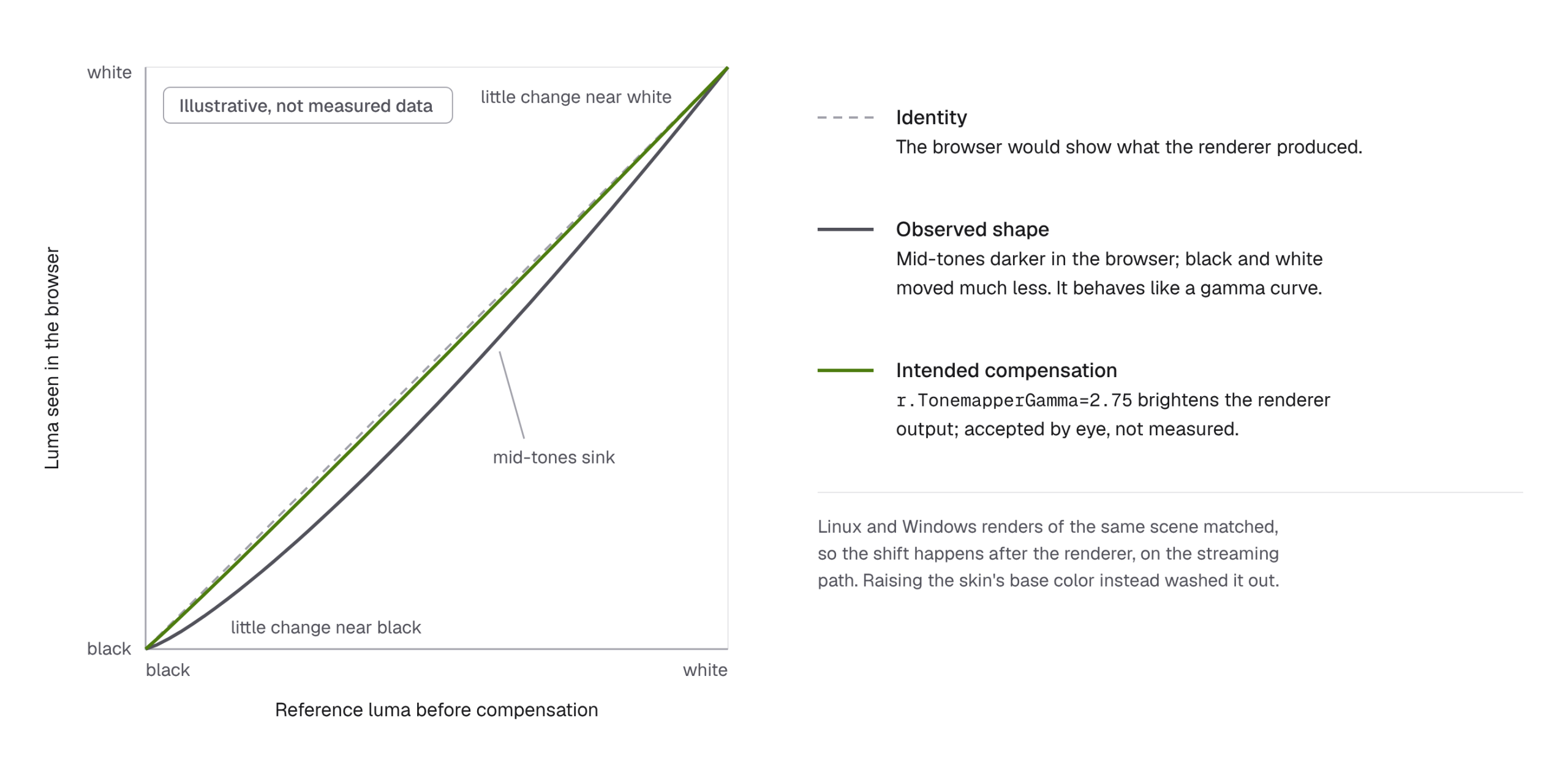
The renderer was not the cause: its Linux render matched the Windows render of the same build and the editor viewport. We did not split the shift between VST and the client. Brightening the skin was the wrong fix: doubling the face’s base color multiplier washed the face toward white.
The shipped fix is the startup argument -ini:Engine:[ConsoleVariables]:r.TonemapperGamma=2.75, and we accepted the result by eye. Resolution and encoder are env vars of the renderer StatefulSet: IAUEMS_WINDOW_WIDTH, IAUEMS_WINDOW_HEIGHT and IAUEMS_DEPLOYMENT_ADDITIONAL_STARTUP_ARGS, which also carries the gamma flag [9]. The chart default is 1280×720 with VP8, and ours was 1920×1080. A helm upgrade would re-render them; our startup check prints the kubectl set env command on drift.
9. When GPU pods silently lose the GPU
Tokkio 5.0’s GPU pods (VST, Audio2Face-3D, Triton, Riva, the Animation Graph and the renderer) get their GPU through the NVIDIA runtime and NVIDIA_VISIBLE_DEVICES, set in the pod spec for four of them; Riva and the Animation Graph set none and see every GPU. None of them requests nvidia.com/gpu. Our node ran containerd with the systemd cgroup driver on cgroup v2, the toolkit’s legacy hook, and CDI off. In that setup the GPU grant exists only in device rules that the NVIDIA hook writes behind systemd’s back [15]. Any systemctl daemon-reload rebuilds the rules without it [16]. Our reloads came from the daily package-update timer and snap refreshes.
Caution. Disabling the timer that causes the reloads is itself a reload, because systemctl disable and enable reload the systemd daemon. Do it only while the Tokkio workloads are scaled to zero.
Nothing breaks at reload time: the kernel checks device permission only at open, so open handles keep working and every pod stays Running (Figure 4). The next open() fails, with a misleading error. VST opens a new hardware encoder per browser session, so the first session after a reload crashed it, repeatedly. Its log blamed /dev/v4l2-nvenc, but on x86 that library loops over /dev/nvidia0 to /dev/nvidia15. We never caught the permission error at the crash instant, so this is our best-supported explanation.
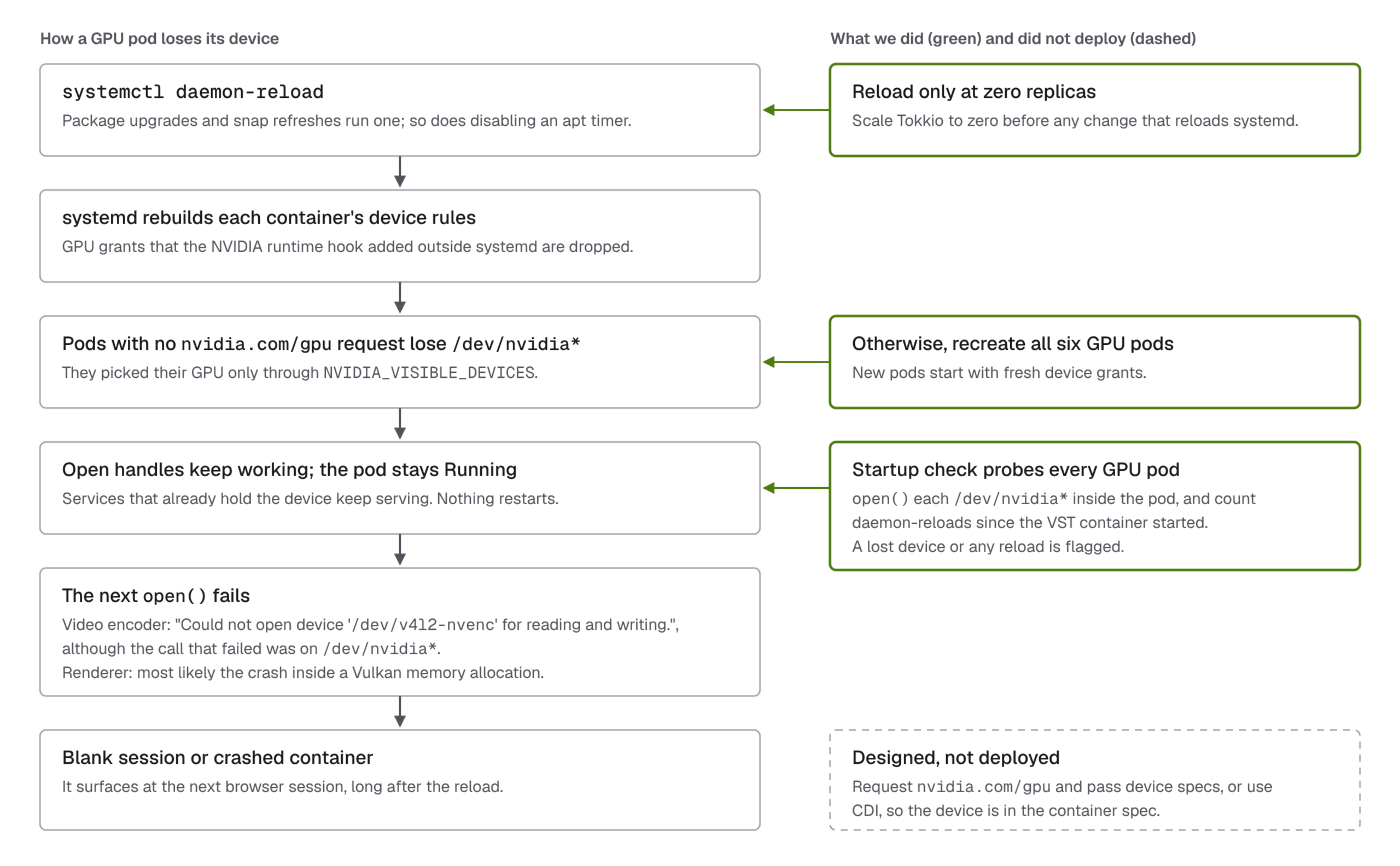
On 2026-09-18 we disabled the apt timers with the stage up, and five of six GPU pods lost access. Our rule is that anything that reloads systemd runs at zero replicas. If a reload slips through, freeze its source and delete all GPU pods. The startup check opens every /dev/nvidia* inside each GPU pod and counts reloads since VST started. The structural fixes we designed were an nvidia.com/gpu request with the device plugin set to pass device specifications, or CDI, so that the devices enter the container specification [15]; we judged both too risky before a show and deployed neither.
A manual reboot into a new kernel added a race. The kubelet restarted the Tokkio pods before the toolkit DaemonSet had rewritten containerd’s config, so their sandboxes had no /dev/nvidia*. CrashLoop restarts containers, not sandboxes, so wait for the toolkit DaemonSet to report Ready, then delete the pods.
10. Common problems and where to fix them
Part 1 closed with a table of asset symptoms. This is the runtime counterpart.
| Symptom | Where to fix |
|---|---|
| Renderer and video | |
add_stream returns 400; audio but no video | The actor from GetActor() lacks UACEAudioCurveSourceComponent. Fix the Unreal build. |
| Pod Running, every session blank after a renderer crash | The engine can fail to rebind port 8021. Delete the pod, and probe :8021/health from inside the cluster. |
| GPU and cluster | |
VST crashes on the first session after host maintenance; its log blames /dev/v4l2-nvenc | A daemon-reload revoked GPU access. Reload only at zero replicas; otherwise delete all GPU pods (section 9). |
11. What we have not measured
We never measured microphone-to-speaker latency, ASR character error rate, what word boosting changed, or how often the filler intent rules misclassify. We have not verified that playback and Audio2Face-3D receive the same PCM on the Tokkio path. The exact renderer binary we shipped has no continuous 12-hour soak on file. For the event, the controller logs that feed our latency report were lost when the stage was scaled to zero.
Where this leaves the series
Part 1 ended with a hand-off package [1], and this article took that package onto a running stage. Part 1 owns the asset and its facial contract; this part owns the runtime around it. The ACE runtime connection is in sections 3 and 4, and the renderer actor’s per-frame path is in section 4, seen from the integration side. The camera component inside the Unreal renderer comes with the packaged build. VST, which handles the browser’s camera and audio streams, is in sections 8 and 9. Write down what ready means, check it on every start, and keep the evidence.
References
Links checked September 2026. Tokkio and ACE documentation links point to the archive site; the Riva and Container Toolkit links point to current documentation, not to the versions we ran.
[1] DTC Tech Blog. Creating a Custom Avatar for NVIDIA Tokkio with Character Creator 5 and Unreal Engine →
Part 1 of this series: the hand-off package and, in its section 7, 52 ACE inputs mapped to 54 CC5 targets.
[2] NVIDIA. Tokkio 5.0 GA release notes →
Tokkio 5.0 GA uses pipecat 0.0.68.
[3] NVIDIA. Audio2Face-3D Microservice: Release Notes →
Includes the 1.3.16 entry.
[4] NVIDIA. Unreal Renderer Microservice: Custom Avatar, Arbitrary Asset →
ACE plugins written and built for Unreal Engine 5.3; an ACEAudioCurveSource on the avatar actor.
[5] NVIDIA. Tokkio 5.0: Architecture →
The answer path from Audio2Face-3D through the Animation Graph to the renderer.
[6] NVIDIA. ACE Controller Microservice: User Guide →
The controller as pipecat plus the nvidia-pipecat extension.
[7] NVIDIA. Tokkio 5.0: Customization Options →
llm_processor in config.yaml with three stock LLM services; other processors, TTS included, in bot.py.
[8] NVIDIA. Tokkio 5.0: Tokkio UI Troubleshooting →
VST_INBOUND_STREAM_ERROR: the UI cannot connect to the inbound avatar stream; TURN problems are the most common cause.
[9] NVIDIA. Unreal Renderer Microservice: Parameters →
HTTP API port 8021; IAUEMS_WINDOW_WIDTH and IAUEMS_WINDOW_HEIGHT, 1280 and 720 by default; additional startup arguments.
[10] pipecat. tts_service.py at v0.0.68 →
With push_text_frames off, the subclass must push LLMFullResponseEndFrame.
[11] pipecat. Pull request #4145: TTS improvements →
From 0.0.108, the base class emits the end frame for turns with audio.
[12] pipecat. Issue #5654: TTSService with push_text_frames=False drops the LLMFullResponseEndFrame of any turn that produces no audio →
Open as of 2026-09-28.
[13] NVIDIA. Riva ASR Overview →
Language table including Japanese (ja-JP) Conformer models.
[14] NVIDIA. Basics of Speech Recognition and Customization of Riva ASR →
Word boosting at request time.
[15] NVIDIA. NVIDIA Container Toolkit: Troubleshooting →
A daemon-reload under systemd-managed cgroups drops GPU access that the legacy hook granted; explicit device nodes or CDI prevent this.
[16] NVIDIA. gpu-operator issue #503: Kubernetes containers using NVIDIA_VISIBLE_DEVICES lose device access after systemctl daemon-reload →
Containers using NVIDIA_VISIBLE_DEVICES lose GPU access on daemon-reload; pods with resource requests keep it.
Pingback:Creating a Custom Avatar for NVIDIA Tokkio with Character Creator 5 and Unreal Engine – DIGITAL TWIN CENTER